> For the complete documentation index, see [llms.txt](https://docs.symm.io/llms.txt). Markdown versions of documentation pages are available by appending `.md` to page URLs; this page is available as [Markdown](https://docs.symm.io/trader-documentation/interacting-with-contracts/closing-a-position-on-chain.md).
# Closing a Position On-Chain
If you need to close your position or cancel a quote to unlock collateral but the frontend is unavailable, you can follow these steps to execute the operation manually.
### Solution 1: Use the Symmio Intent Explorer
#### Step 1: Find the Wallet you made the account under
Paste the wallet address that you traded with into the [Symmio Intent Explorer](https://intent.symmscan.com/profile).
Symmio Intent Explorer
#### Step 2: Initiate the Close and Confirm
How to Initiate the Close
Confirmation of Close
### Solution 2: Manually Close with a Block Explorer
#### Step 1: Locate the Transaction When You Opened the Position
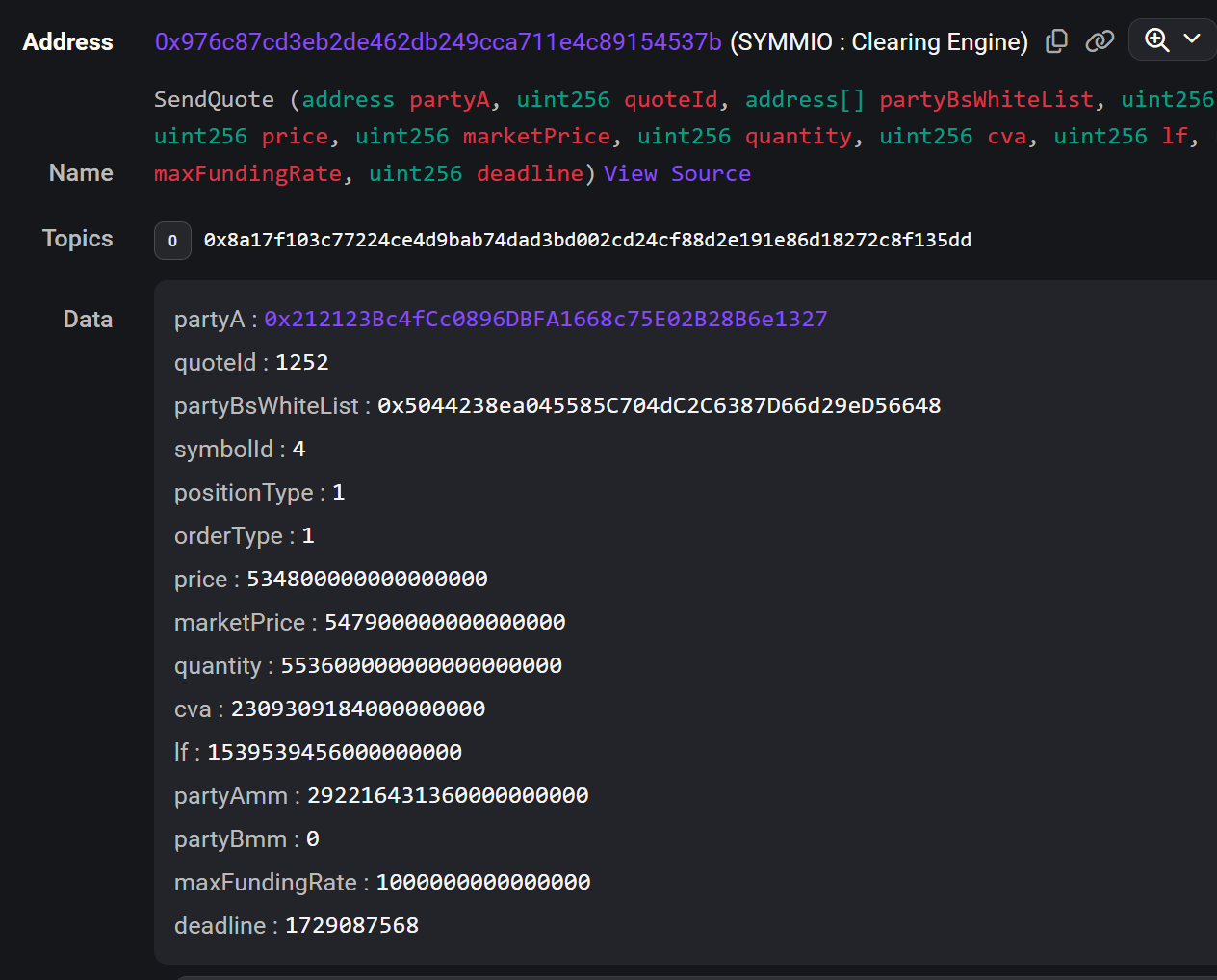
You need to find the `SendQuote` event log that was emitted when you initially opened your position. This log contains essential information such as the `partyA` address and the `quoteId`. You can obtain this information from a block explorer (like Etherscan) by searching for your account and looking for `_call()` transactions .
Here’s an example of what the `SendQuote` emitted event might look like:
sendQuote event
#### Step 2: Find the `calldatas[]` for Closing the Position
You need the `calldata[]` to send to the diamond contract (in this case, the SYMMIO Clearing Engine) to request to close your position. Here's how you can do that:
1. **Find the Diamond Address**: From the `SendQuote` log (from Step 1), identify the address of the SYMMIO Clearing Engine It will look something like this:
```plaintext
Address:
0x976c87cd3eb2de462db249cca711e4c89154537b
(SYMMIO: Clearing Engine)
```
2. **Access Louper.dev**:
* Go to [louper.dev](https://louper.dev).
* Paste the diamond address and select the correct chain (e.g., Ethereum, BSC, etc.).
* Connect the wallet you originally used to open the position.
3. **Request to Close the Position**:
* Navigate to the **Write** tab in louper.dev.
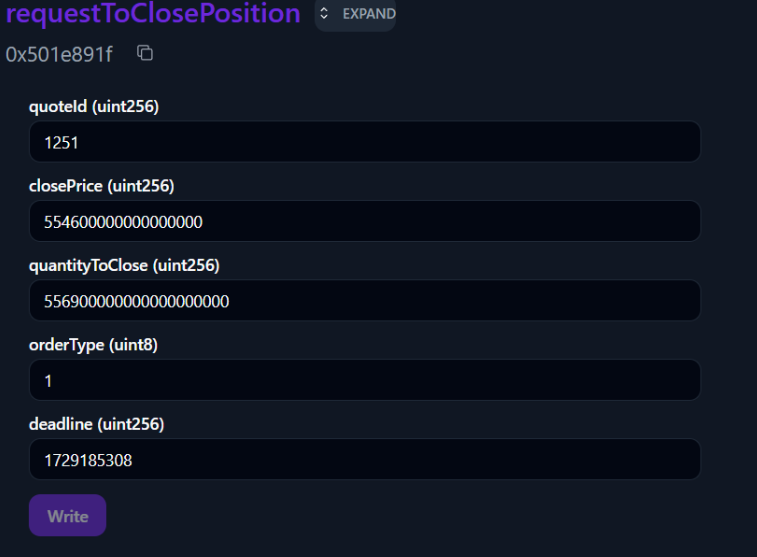
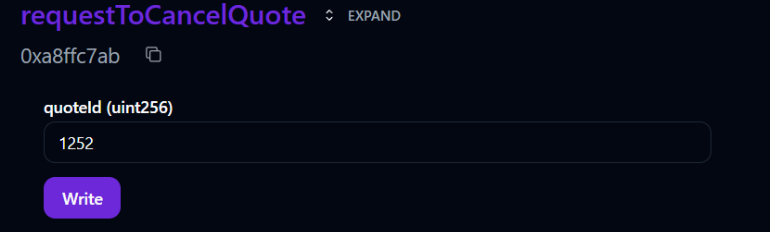
* Look for the function `requestToClosePosition` (or `requestToCancelQuote` if the quote was never responded to). Populate the fields using the data you extracted from the `SendQuote` log:
requestToClosePosition example
requestToCancelQuote() example
Make sure you adjust the closing price to ensure it reflects current market price with some added slippage to ensure that the closing operation goes through. For longs the `closePrice` should be slightly less than the `marketPrice` and for shorts the `closePrice` should be slightly more than the `marketPrice`
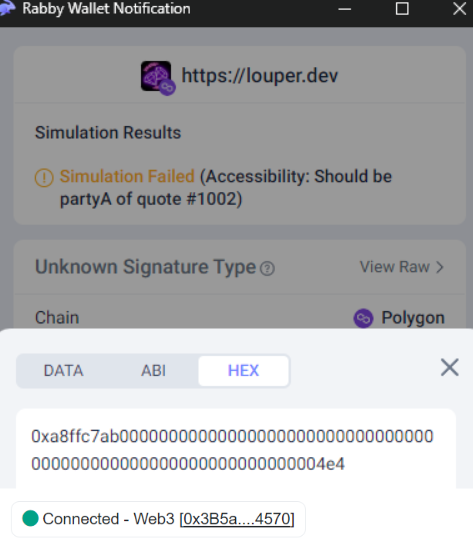
Once you’ve populated the fields, click **Write** and wait for a wallet popup. Click the **View Raw** button to see the raw transaction data. This is where you’ll see the `calldata[]` generated. Copy this as a HEX string.
#### Step 3: Execute the `_call()` on the MultiAccount Contract
Now that you have the `calldata[]`, you can manually execute the closing request:
1. **Find the MultiAccount Contract**: This is the contract you used to open the position, the same one you checked the logs for to find the SendQuote event.
2. **Perform the `_call()`**:
* Connect your trading wallet to the appropriate block explorer depending on the chain the trade was opened on (e.g., Etherscan or another compatible tool).
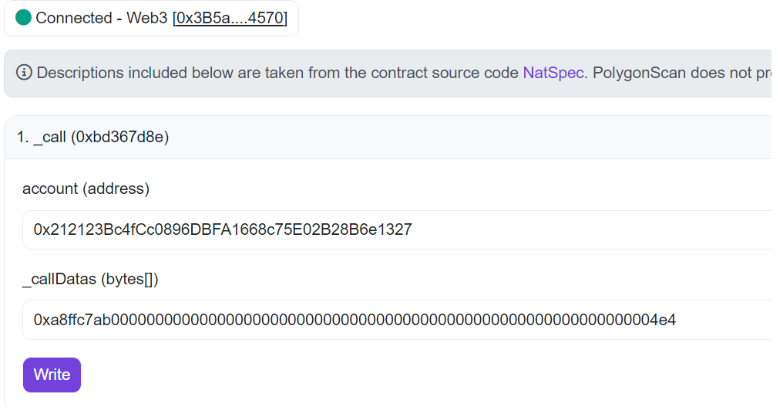
* Perform a `_call()` by pasting the `calldata[]` and `partyA` address into the appropriate fields.
{% hint style="info" %}
The `partyA` is not the wallet you use but the sub-account address. You can find the `partyA` address in the details of the sendQuote event.
{% endhint %}
Writing with a Block Explorer
Submit the transaction on-chain to close the position by clicking **Write**. If everything was set up correctly, the position should be closed successfully.
{% hint style="info" %}
If you encounter an "is not a valid array" error, you must send the calldata as a hex string, enclosed in brackets and quotes e.g.
`["0xa63b936300000000000000000000000000000000000000000000000000000000000002ba"]`
{% endhint %}
---
# Agent Instructions
This documentation is published with GitBook. GitBook is the documentation platform designed so that both humans and AI agents can read, navigate, and reason over technical content effectively. Learn more at gitbook.com.
## Querying This Documentation
If you need additional information that is not directly available in this page, you can query the documentation dynamically by asking a question.
Perform an HTTP GET request on the current page URL with the `ask` query parameter, and the optional `goal` query parameter:
```
GET https://docs.symm.io/trader-documentation/interacting-with-contracts/closing-a-position-on-chain.md?ask=&goal=
```
`ask` is the immediate question: it should be specific, self-contained, and written in natural language.
`goal` is optional and describes the broader end goal you are ultimately trying to accomplish on behalf of the user. GitBook uses it to tailor the answer towards what is most useful for that goal.
The response will contain a direct answer to the question and relevant excerpts and sources from the documentation.
Use this mechanism when the answer is not explicitly present in the current page, you need clarification or additional context, or you want to retrieve related documentation sections.