> For the complete documentation index, see [llms.txt](https://docs.symm.io/llms.txt). Markdown versions of documentation pages are available by appending `.md` to page URLs; this page is available as [Markdown](https://docs.symm.io/liquidity-provider-documentation/solver-settings/maintenance-margin-cva-calculations.md).
# Maintenance Margin (CVA) Calculations
Provided by Rasa Capital
{% hint style="info" %}
**CVA and Max Leverage:**
**Note: contract parameters — maintenance margin and maxLeverage — are set by Solvers based on their own risk assessment.**
**The Rasa Solver has the following (basic) settings.**
***1) logic is as follows***
* CVA is the overall maintenance margin ( in case of liquidation, part goes to liquidators as incentives, part to the non-liquidated party who they needs to unwind their positions )
* CVA is a fixed proportion of initial notional:
*cn = CVA/Notional=CVA/(deposit\*leverage)*
*$CVA = cn \* notional (with cn fixed per market)*
cn depends on the volatility and risk of the coin.
* When measured as a fraction of collateral, CVA increases with leverage:
*cd = CVA/deposit = cn \* leverage*
* In order to avoid excessive trader risk, leverage is capped so that maintenance margin (CVA) does not exceed 60% of deposit.
* The initial CVA in dollar terms remains unchanged as long as the position in unchanged
***2) parameters are as follows***
* cn=CVA/notional starts from just above to 1% (1.08% for BTC and ETH), is 1.3-1.5% for blue chips (most alt and layer 2 coins), 4%-5% for exotic coins (three very risky coins require even more margin)
* maxLeverage (where cd=CVA/deposit = 60%) is 60x for ETH and BTC, 40-50x for alts and layer 2 (ARB, OP), and down to 20-25 for exotic coins (3 coins have lower leverage)
Overall, each Market has a different parameters depending on its volatility and risk, with max leverage falling as risk increases, see full list in [Max Leverage](/liquidity-provider-documentation/solver-settings/max-leverage.md).\
{% endhint %}
## CVA and maxLeverage Formulas:
$$
maxLev= 60%/ ($CVA/notional) = 60%/ cn
$$
maxLeverage is (expect for 3 coins) is in the 20-60 range
## **Example:**
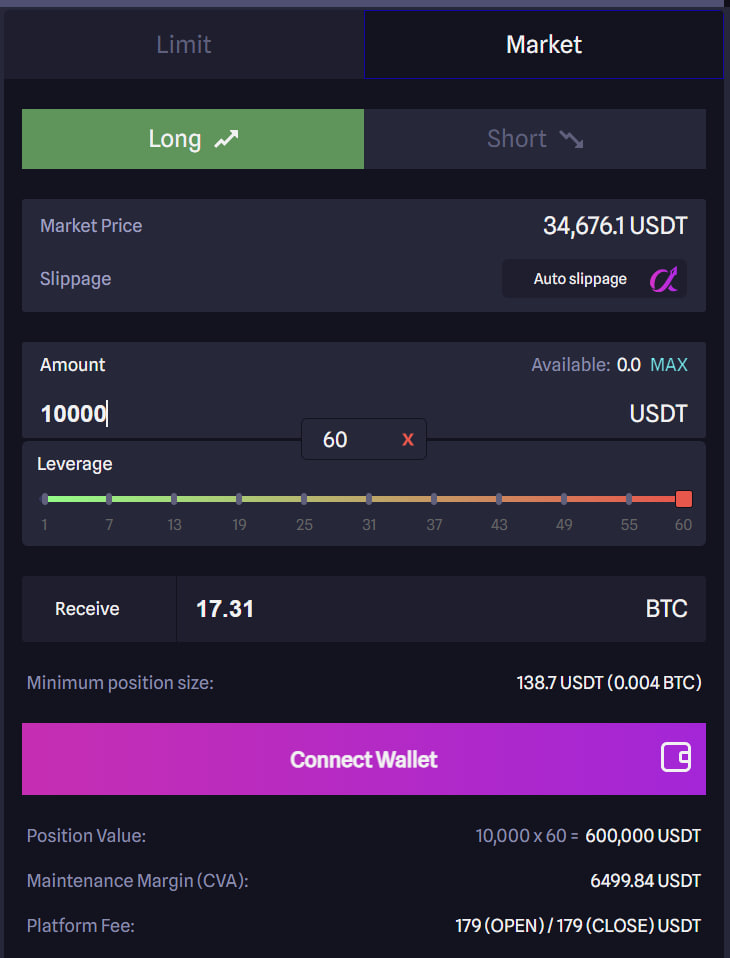
Consider a scenario where User A desires to engage in a trade with a leverage of buying a 10,000 USDT 60x BTC Long (the maximum leverage for BTC is set at 60x).
1. **User A navigates to the** [**SYMMIO `frontend`.**](https://www.symm.io/frontends)
2. **Upon arrival, User A expresses an intent:**
```
Tade Size: 10,000 USDT
Leverage: 60x,
Notional value: 600,000 USDT.
Price: $34,676.1 per BTC,
Size: 17.31 BTC.
```
3. **The frontend then responds with the Solvers required Maintenance Margin of:**
```
CVA: 6499.84 USDT
```
#### The CVA (Credit Value Adjustment) for this trade is calculated as:
$$
CVA=10,000×0.60
\= 6000USDT
$$
{% hint style="danger" %}
Should the unrealized profit and loss (uPnL) on his BTC position reach -$4000, User A will automatically be moved into the Liquidation Process by Liquidators.\
\
This example illustrates the interplay of leverage, CVA, and the liquidation threshold within the Rasa - Demo Solver environment through a SYMMIO frontend.
{% endhint %}
## Integration with API endpoints
Solver endpoints provide real-time parameters for collateral requirements via a REST API. See Rasa's endpoints [here](broken://pages/yctCxq2u9qGCOSJPJVzu).
#### **Endpoint Structure**
```bash
GET /get_locked_params/{symbol}?leverage={leverage}
```
**Example**:
```bash
https://base-hedger82.rasa.capital/get_locked_params/BTCUSDT?leverage=60
```
The endpoint returns the following response:
```json
{
"cva": "40", // CVA (% of deposit)
"lf": "20", // Liquidation Fee (% of deposit)
"leverage": "60.0", // Allowed leverage
"partyAmm": "40", // Party A’s initial margin (% of deposit)
"partyBmm": "0" // Party B’s initial margin (0 for single-sided)
}
```
***
### **2. Deriving `cn` (CVA/Notional Ratio)**
`cn` represents the **total Maintenance Margin (CVA + LF)** as a percentage of the **notional value**. The cn is ultimately defined by the solver. This should reflect the risk of the asset.
#### **Formula**
$$
cn = \frac{\text{cva} + \text{lf}}{100 \times \text{leverage}}
$$
#### **Example Calculation**
Using the API response for BTCUSDT:
```json
{
"cva": "40", // CVA (% of deposit)
"lf": "20", // Liquidation Fee (% of deposit)
"leverage": "60.0", // Allowed leverage
"partyAmm": "40", // Party A’s initial margin (% of deposit)
"partyBmm": "0" // Party B’s initial margin (0 for single-sided)
}
```
* `cva = 40%`, `lf = 20%`, `leverage = 60x`
* Deposit = 100 USDT (for illustration).
$$
cn = \frac{40 + 20}{100 \times 60} = \frac{60}{6,000} = 0.01
$$
***
### **3. Calculating Maintenance Margin**
The Maintenance Margin can derived from `cn` and the **notional value**.
#### **Formula**
$$
\text{Maintenance Margin} = cn \times \text{Notional}
$$
#### **Example**
* **Notional** = Deposit × Leverage = 100USDT × 60 = 6,000 USDT
* **`cn`** = 1% (from above).
$$
\text{Maintenance Margin} = 0.01 \times 6,000 = 60 \text{USDT}
$$
***
### **4. Calculating Max Leverage**
The maximum allowed leverage (`maxLeverage`) is determined by the **CVA/Deposit cap** (`cd ≤ 60%`) and `cn`.
{% hint style="info" %}
With higher `cn` the `maxLeverage` must decrease proportionally
{% endhint %}
#### **Formula**
$$
\text{maxLeverage} = \frac{0.6}{cn}
$$
#### **Example**
For BTCUSDT with `cn = 1%`:
$$
\text{maxLeverage} = \frac{0.6}{0.01} = 60x
$$
**Example Scenarios**:
| Asset Type | `cn` | Max Leverage |
| ------------------ | ---- | --------------------- |
| **BTC/ETH** | 1% | ( 0.6 / 0.01 = 60x ) |
| **Blue-Chip Alts** | 1.5% | ( 0.6 / 0.015 = 40x ) |
| **Exotic Coins** | 4% | ( 0.6 / 0.04 = 15x ) |
The [contract-symbols](/api-endpoints-and-deployments/solver-addresses-and-endpoints/rasa-capital.md#get-contract-symbols) endpoint should return this maxLeverage as a parameter in the endpoint.
Example for Rasa BTCUSDT:
```json
{
"price_precision": 1,
"quantity_precision": 3,
"name": "BTCUSDT",
"symbol": "BTC",
"asset": "USDT",
"symbol_id": 1,
"is_valid": true,
"min_acceptable_quote_value": 120,
"min_acceptable_portion_lf": "0.003000000000000000",
"trading_fee": "0.000600000000000000",
"max_leverage": 60,
"max_notional_value": 2100000,
"rfq_allowed": true,
"hedger_fee_open": "0.0006",
"hedger_fee_close": "0.0006",
"max_funding_rate": "200",
"min_notional_value": "100",
"max_quantity": "1000",
"lot_size": "0"
},
```
---
# Agent Instructions
This documentation is published with GitBook. GitBook is the documentation platform designed so that both humans and AI agents can read, navigate, and reason over technical content effectively. Learn more at gitbook.com.
## Querying This Documentation
If you need additional information that is not directly available in this page, you can query the documentation by asking a question.
Perform an HTTP GET request on the following URL with the `ask` and `goal` query parameters:
```
GET https://docs.symm.io/liquidity-provider-documentation/solver-settings/maintenance-margin-cva-calculations.md?ask=&goal=
```
`ask` is the immediate question: it should be specific, self-contained, and written in natural language.
`goal` is what the user is ultimately trying to achieve, the reason they need the answer. Sharing it helps GitBook give you a better, more relevant answer. A goal is most helpful when it describes the outcome the user wants rather than restating the question. For example, with `ask=how do I create an API token`, a goal like `automate deployments from our CI pipeline` lets GitBook tailor the answer to that use case.
The response will contain a direct answer to the question and relevant excerpts and sources from the documentation.
Use this mechanism when the answer is not explicitly present in the current page, you need clarification or additional context, or you want to retrieve related documentation sections.